SYSTEC Logo
SITE INDEX

Color Coding

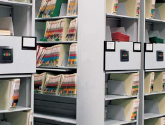
Color coding assists in the retrieval and re-filing of file folders. In most environments, it can save 40% - 60% time over a similar system without color coding. It does this by narrowing the field of search, it allows quick location of files by using visual ques and patterns.

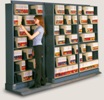
A well designed system also assists in locating misfiles. Properly used endtab color coding will form "bands" of color that will be broken if a file is wrongly placed.

THE BASICS

A color-coded label system applied to folders provides visual indexing that aids in the quick identification and processing (retrieval and re-filing) of file folders and other media, while they are located on a shelf.
Color coding can take many forms. In some cases, the file folders themselves are colored to indicate different groups or types of files. Even a single label affixed to the file folder can provide information relating to the file. When multiple bands of color coding is used on one file folder, they can form their own unique set of identifiers.
Color coding can be alphabetic, numeric, symbols, or bars of colors. The way in which they are combined on the file folder determines the way in which the file folder is filed and retrieved. The importance of appropriate color coding cannot be overemphasized. Misuse of color coding can cause file retrieval and re-filing to be overly complicated and difficult to maintain.

HOW DOES COLOR CODING WORK?

Color allows a person to visually scan file folders looking for specific colors/color combinations in order to identify a folder or a small section of the filing system where a record is located. Without color coding, information on the folder must be read and evaluated and the person must think through where the record should be within a filing system. Color minimizes thought and makes filing faster and less error-prone. In addition, if a file is placed incorrectly within the filing system, to find the mis-filed record all of the folders would have to be searched one-by-one to find the missing folder. With color coding, all you have to do is quickly scan the groups of color to identify a color that is in the wrong place.
Records are always filed by a primary index, which is how a folder is searched for and retrieved from the shelving. Identifying the elements of a customer's primary index and the type of filing system will depend on the unique characteristics of the organization. This is typically achieved by color-coding alphabetically by the first two or three letters of a person's or organization's name, or by color-coding numerically by a computerassigned number (like a patient number, policy number, employee number, social security number, etc.).
Most organizations have a computer system and a database of records related to their customers or clients. Computers typically assign numbers in sequential order. This number represents a unique identifier for a particular record. For example, in a doctor's office, the computer will assign the next available number from the computer to each successive patient. Another example is in a law or accounting firm, where a new policy or client gets the next consecutive computer number. Other offices, particularly the government, will use a person's social security number to index and color-code the record.

THREE MAJOR COMPONENTS OF A COLOR-CODED FILING SYSTEM

The file folder itself. The customer's choice of a file folder is directly related to how much documentation will be placed in the folder. Consider how much the folder needs to expand and how durable its construction needs to be. File folders are predominantly made of manila of varying thicknesses. Pressboard folders are used for applications needing extra expansion and durability, and 'pocket/accordion' folders are used for extra-thick records. There are also a wide selection of custom folder solutions.
Organization of documents within the folder. This is a critical issue, because over 90% of the cost of a filing system is said to be the labor to find, use and file documents or materials that are in the folder. There are always requirements for making copies and finding specific information. Documents within folders can be organized by defining logical subsets of documents that go into the folder. Available accessory items can be incorporated to add organization, including fasteners, pockets, chart dividers, file backs and stitched dividers.
Indexing and labeling. Labeling is used to identify file folders, and typically includes color-codes, variable data/text and bar codes or other tracking method. Each folder will have a primary index that identifies how the folder is filed, typically color-coded alphabetically or numerically. Secondary index information can include color labels designating year, geographic region, type of employee, etc. Indexing also may include text information about the record, like a patient name, type of loan, or date-of-birth. Bar coding is also beneficial to identify the folder and track its movement.

BENEFITS

Instant visibility. Color-coding utilizes colors to represent numbers so that color blocks direct the file user to the file location desired. File personnel zero in on the desired folder while moving toward it.
Accuracy and control. Misfiles are instantly flagged since color blocks will not match. It is virtually impossible to misfile a folder.
Time saving. Blocks of color speed collating, pre-sorting, scanning, selection and retrieval of records.
Training aid. New file personnel associate colors with numbers without conscious effort. The system eases the supervisor's training program since the system is totally visible.
Reduced operating costs. Since nearly 80 cents of every dollar spent on filing is expended on labor, the increased speed in filing operation will affect substantial cost savings.
Improved working atmosphere. One of the benefits often overlooked is that use of color-coding in the records area creates an improved working environment. It is a logical, visible system with which employees enjoy working.